Up is up: steering a telescope by what you see
Back when I wrote up my Celestron NexStar, I had to warn people that "up" on the hand controller isn't always "up" in the eyepiece. That's still true with the new mount, and it drove me nuts on the first night out with this project.
In my last post I set up my EQ6-R mount badly on purpose and had Claude figure out where it was pointing from photos I took through the eyepiece with my phone. That part worked. Getting the Moon, and later Saturn, into the middle of the view was harder. I'd be at the eyepiece saying something like "down five percent, left twenty," Claude would nudge the mount, and about half the time it went the wrong way.
So I asked for something simple: when I push up, the stars should move up.
Why the arrows go the wrong way
The mount has two motors. One spins the telescope around an axis that points at the North Star, and the other tips it toward or away from it. Astronomers call them RA and Dec, which is great on a star chart and means nothing when your eye is at the eyepiece.
It gets worse. The light bounces off a mirror before it reaches your eye, so the view is flipped. Twist the eyepiece in its holder and the view rotates. Swing the telescope around to the other side of the mount and everything turns upside down. Which motor moves the view up depends on all of that.
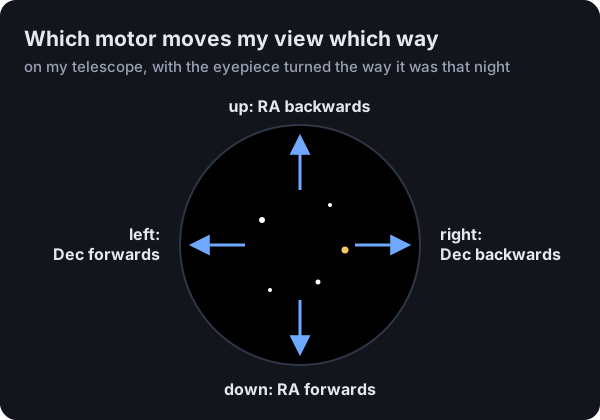
The fix is pretty boring. The software keeps a little map of which motor moves the view down and which one moves it right, and up and left are just the opposite. If your setup is different, there are buttons to flip up/down, flip left/right, or rotate the whole map if you've turned the eyepiece.
There's a lot going on between the D-pad and the motors
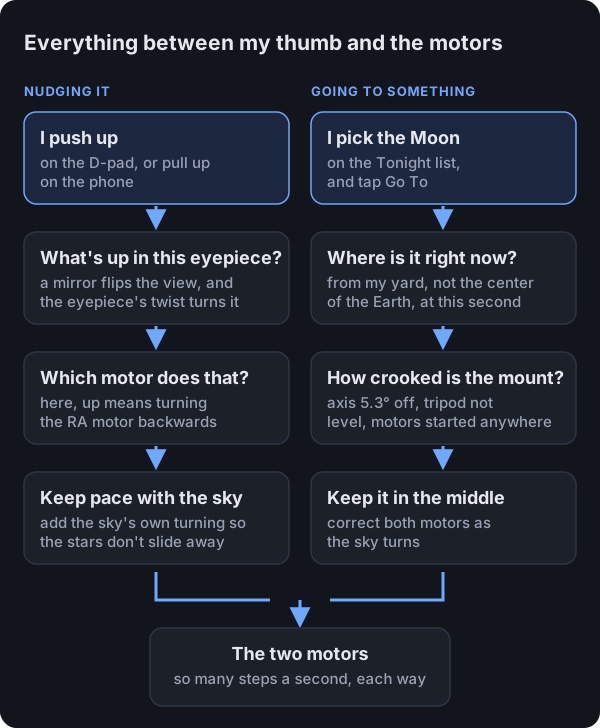
When I push up, the software looks up which motor moves the view that way and runs it. It also has to add in the speed the sky is already turning, because the mount is always tracking the sky. Without that, the stars jump every time you touch the controls. When I let go, it goes back to just tracking.
Go To takes a different path. It has to work out where the Moon is from my backyard right now, then account for how crooked my mount is, which was the whole point of the last post. Both paths end up as the same two motors turning at some number of steps per second.
The phone is a touchpad shaped like the eyepiece
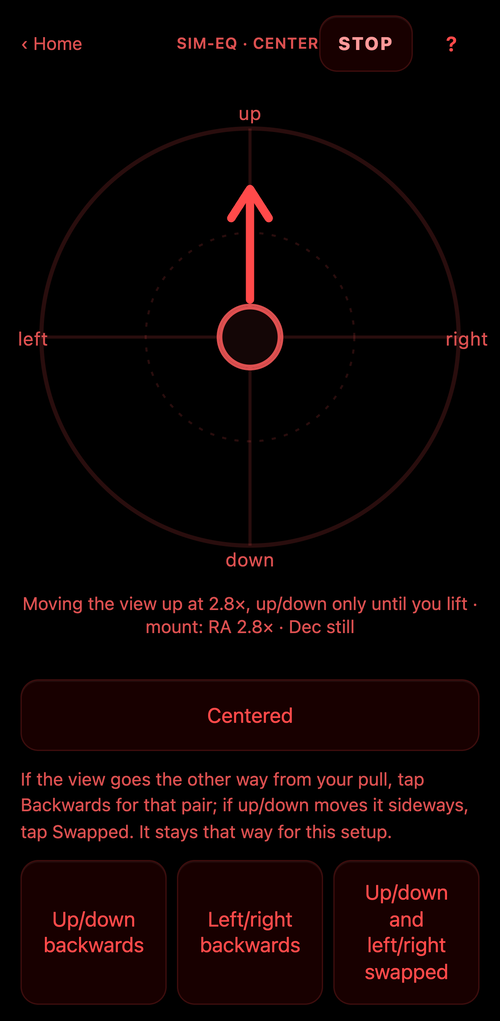
You put your thumb on the circle and drag the way you want the view to go. A little drag creeps along, dragging to the edge goes about 16 times faster, and letting go stops it.
The first version was a white circle. I walked out to the scope, looked down at my phone, and got what I described at the time as "a big white light blasting in my eyeballs." It's red now, always, since red light doesn't wreck your night vision.
It also measured your drag from the center of the circle, which doesn't work when your eye is at the eyepiece and you can't see where the center is. As soon as my thumb touched the glass it was already dragging in some random direction. ("My thumb is just not following the screen," I told Claude.) Now wherever your thumb lands is the starting point. I also had it lock onto one direction per drag, because my thumb would drift sideways without me noticing and Saturn would slide out the side of the view.
The D-pad on the game controller works the same way
I drive the mount with an old Microsoft SideWinder Dual Strike. Its D-pad uses the same map as the phone now, so fixing a direction in one place fixes it in both.
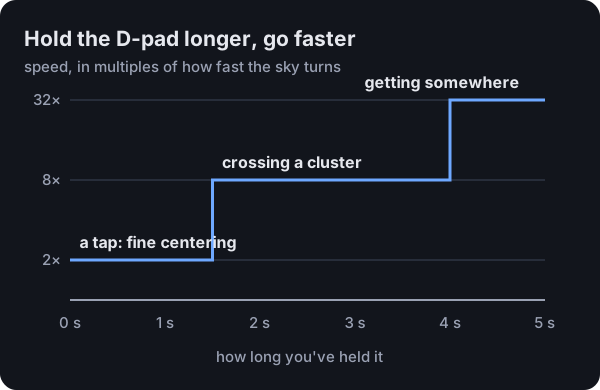
It was slow at first. A tap moves the view at twice the speed of the sky, which is perfect for nudging Saturn into the middle and painful for crossing the Pleiades, which is about four Moons wide. So now the longer you hold it, the faster it goes.
Check which version someone is running before you fix their bug
At one point I told Claude the D-pad was crossed: pushing left moved the view up and down. It changed the map. Turns out my report came in while the new firmware was still installing on the Raspberry Pi that runs the telescope, so I was still on the old version, which didn't use the map at all. The map had been right the whole time, so we changed it back after the update finished.
This is a pretty common mistake in software, and it's easy to make when you're standing in the dark in your backyard talking to an AI running on a Mac Studio inside your house.
Where it's at
Saturn and the Pleiades both ended up dead center without me having to think about which motor does what, which was the whole point.
The next thing to fix is the upside-down problem. When the mount swings around to the other side to reach something (I wrote about that in The Moon we couldn't go to), the view flips, so the map has to flip with it. The software already knows when it does that, so it should just handle it.